Introducing Email Suppression Visibility
Learn how the new suppressed status gives you visibility into your email performance.
To improve your email deliverability, you need detailed information for each email you send. Previously, suppressions were grouped under the most recent delivery outcome (like bounced or complained).
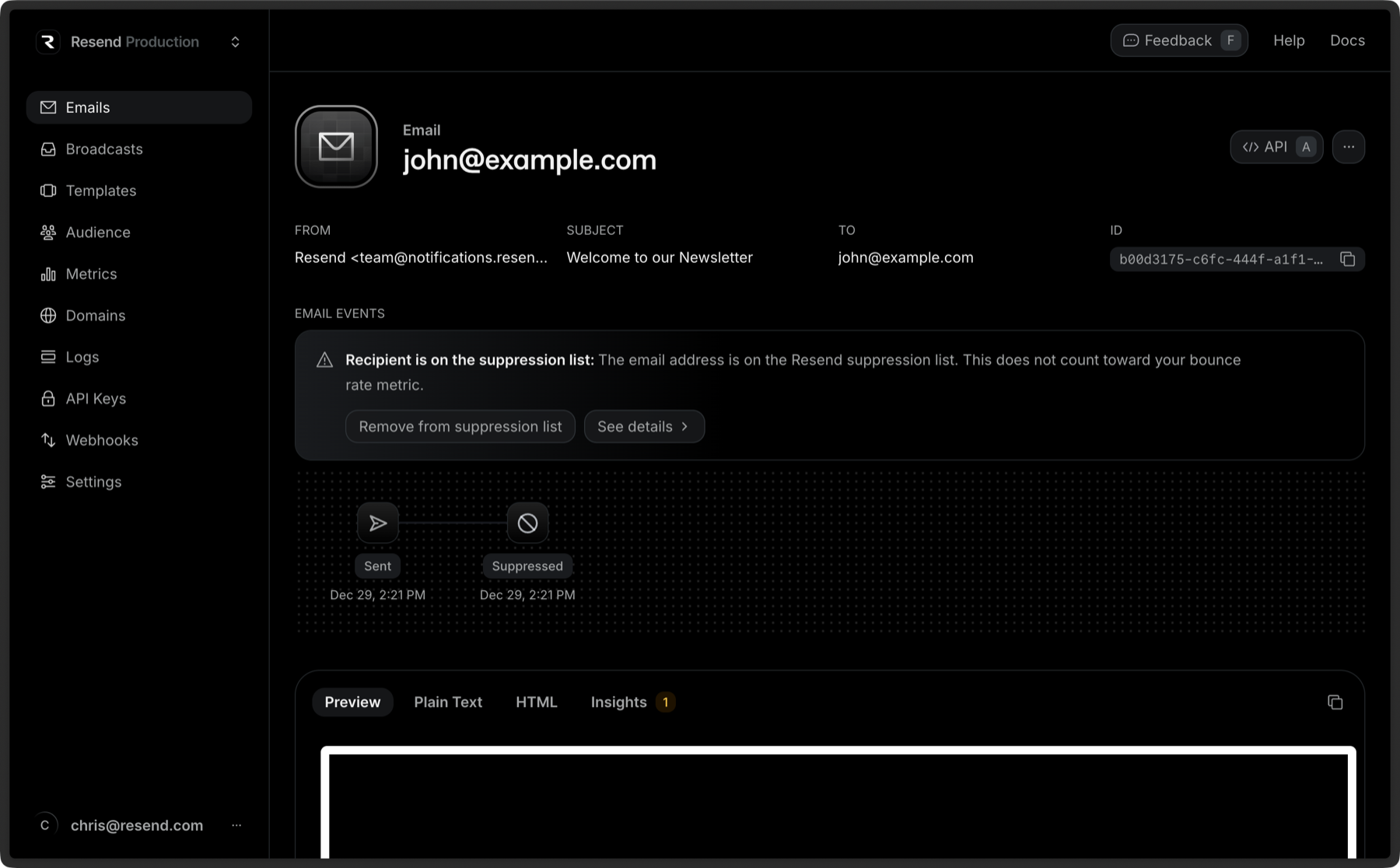
Today, we’re introducing a new suppressed status to give you clearer visibility into your email performance and help you take action with confidence.
What is a suppression?
A suppression happens when Resend intentionally prevents an email from being sent to a recipient. This occurs when previous deliveries to that address have bounced or been complained.
By stopping the delivery before it happens, we help protect:
- Your sender reputation
- Your overall deliverability
- Our shared infrastructure reputation
In this way, Resend works behind the scenes to look out for senders and make email easier to operate at scale.
What’s new?
With this update, suppressions are now first-class citizens in the system. When an email is suppressed, we offer suggested fixes to help you resolve the issue.
Besides that, you will be able to trigger webhooks when an email is suppressed and see suppressed emails on the status chart in the metrics page.
Suppressed delivery status
Emails with a suppressed status now return the following payload in API responses and the dashboard:
{"object": "email","id": "bf6a7576-c02d-4585-8b0e-8c936091884c","to": ["suppressed@resend.dev"],"from": "Resend <onboarding@resend.dev>","created_at": "2025-12-29 19:22:57.316919+00","subject": "Hello world","bcc": [],"cc": [],"reply_to": [],"last_event": "suppressed","scheduled_at": null,"html": "<p>is suppressed</p>"}
Webhooks
You can also listen to the email.suppressed webhook event to get notified when an email is suppressed.
When an email is suppressed, you will receive a HTTP request with a payload that looks like this:
{"type": "email.suppressed","created_at": "2024-11-22T23:41:12.126Z","data": {"broadcast_id": "8b146471-e88e-4322-86af-016cd36fd216","created_at": "2024-11-22T23:41:11.894719+00:00","email_id": "56761188-7520-42d8-8898-ff6fc54ce618","from": "Acme <onboarding@resend.dev>","to": ["suppressed@resend.dev"],"subject": "Sending this example","template_id": "43f68331-0622-4e15-8202-246a0388854b","suppressed": {"message": "Resend has suppressed sending to this address because it is on the account-level suppression list. This does not count toward your bounce rate metric","type": "OnAccountSuppressionList"},"tags": {"category": "confirm_email"}}}
Learn more about using webhooks.
Why this matters
This change gives you:
- More accurate metrics: see what was actually sent versus intentionally skipped
- Better visibility: why certain emails weren’t delivered
- Clearer actions: how to handle suppressions differently from bounces or complaints
If you’re tracking deliverability, building dashboards, or reacting to webhooks, this should make your workflows simpler and more precise.
Is this retroactively applied to previous deliveries?
No, only deliveries suppressed starting today will be marked as suppressed. Previous deliveries will remain in their status.
Looking out for senders
Suppressions are a protective measure, not a failure.
By making them more visible and easier to act on, we’re giving you better tools to maintain a healthy sending reputation and focus on what matters: reaching the inbox.
As always, let us know what you think. We’ll keep shipping improvements that make email feel less like a black box and more like a reliable system you can trust.
For more information, please check out the documentation on email suppressions.